Random Picker Wheel – Free Online Wheel Spinner
Need a quick and simple way to make a random choice? The OmniTools Random Picker Wheel helps you pick a name, choose a winner, assign a task, or decide between multiple options with just one spin.
This free random wheel picker works directly in your browser. Add your choices, spin the wheel, and let it select one option for you. You can use it as a random name picker, online wheel spinner, picker wheel, or random decision maker for classrooms, games, giveaways, group activities, and everyday decisions.
What Is a Random Picker Wheel?
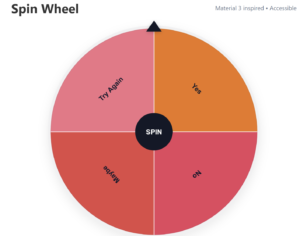
A Random Picker Wheel is an online tool that randomly selects one option from a list. Each choice appears on the wheel, and when you click Spin, the wheel rotates and stops on one of the available entries.
You can add names, numbers, foods, tasks, prizes, teams, questions, places, or other custom options.
It provides a more visual and interactive alternative to manually drawing names or choosing between several possibilities.
For more information about random selection and random number generation, you can also explore the NIST Random Number Generator glossary.
How to Use the Random Wheel Picker
Using the OmniTools Random Wheel Picker is simple.
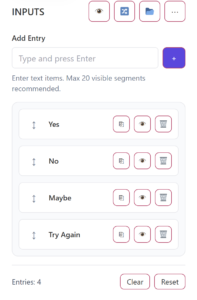
1. Add Your Options
Enter the names, numbers, or other choices you want to include on the wheel.
For example, if you are choosing a restaurant, you could add:
Pizza, Burgers, Shawarma, Sushi, and Tacos.
2. Review Your Entries
Check the list before spinning. Make sure there are no accidental duplicate entries and that every option you want is included.
Short and clear entries usually work best, especially when you have several choices on the wheel.
3. Adjust the Wheel and Spin
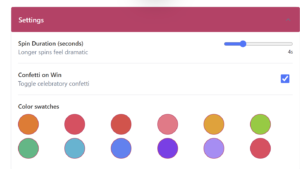
Use the available settings to adjust the wheel if needed. Then click the Spin button to start the selection.
4. View the Result
The wheel will slow down and stop on one of your choices. The selected option becomes your result.
You can accept the result or spin again whenever you need another random selection.
Popular Ways to Use a Wheel Spinner
Random Name Picker
Add names and use the wheel as a random name picker online. This can be useful for classroom participation, team selection, presentation order, games, and group activities.
Spin the Wheel for Decisions
A spin the wheel random picker can help with simple everyday decisions. Add restaurants, movies, activities, or other choices and let the wheel decide.
Classroom Wheel Spinner
Teachers can use a random wheel picker for students to select names, assign topics, choose classroom activities, or determine presentation order.
Giveaways and Games
A free online picker wheel can also be used for informal giveaways, family games, challenges, questions, and team-building activities.
For official or commercial contests, make sure your selection method follows any applicable rules or requirements.
Why Use the OmniTools Random Picker Wheel?
The OmniTools Random Picker Wheel is designed for quick, low-stakes random selections.
You can use it to:
Pick a random name
Choose between different options
Select a task
Decide who goes first
Choose a movie or restaurant
Pick a winner
Make group activities more interactive
The visual wheel also makes random selection more engaging than simply showing a text result.
Explore More Free OmniTools
OmniTools also provides useful online calculators for everyday planning.
If you are planning to purchase a home, try our Manitoba Mortgage Calculator to estimate mortgage payments.
Thinking about financing a vehicle? Use the Auto Loan Calculator to estimate monthly payments and borrowing costs.
For savings and investment planning, our Compound Interest Calculator can help estimate how your money may grow over time.
Frequently Asked Questions
Is the Random Picker Wheel free?
Yes. The OmniTools Random Picker Wheel can be used online directly through your browser.
Can I use it as a random name picker?
Yes. Simply enter each name as an option and spin the wheel.
What can I add to the wheel?
You can add names, numbers, foods, tasks, teams, prizes, locations, questions, or other custom choices.
Can teachers use the Random Picker Wheel?
Yes. Teachers can use it for selecting students, assigning activities, choosing topics, or determining presentation order.
Is it suitable for important decisions?
The tool is best for low-stakes decisions where any listed option is acceptable. Important financial, medical, legal, employment, or safety decisions should not be made randomly.
Spin the Wheel and Make Your Choice
When you need a quick random selection, the OmniTools Random Picker Wheel makes the process easy.
Add your choices, click Spin, and let the online wheel spinner choose for you. Whether you need a random name picker wheel, spin the wheel decision maker, or free picker wheel online, you can enter your options above and start spinning.